Thanks for purchasing the RPM Percent Bot.


If you have subscribed to EasyBetbot( http://easybetbot.com/) in the past, then you can go through this manual very quickly.


Let’s start the deep dive into the RPM Percent Bot.


Once you open the bot, complete the registration process and click on desktop icon, then you will see the below screen, where you should input your Betfair id and password and click on login.

Select the right betfair in the domain and put your credentials and you will able to login into the RPM Percent Bot.

On the left-hand side, you can see all the markets related to Horse Racing for Australia  New Zealand, UK, Ireland , SA and others (depending on what country you select) which are available for next 12 hours on betfair have been loaded upfront.

Wallet – it will show the current balance in your betfair account.


Profit Back1/Back2/Back3/Back4/Lay1/Lay2 – It will show the overall profit/loss for any back/lay strategy.

As you can see, you can run upto four different Backing strategies and 2 laying strategies. You can select countries you want to bet specifically for each strategy.

Very important to keep at least first 2 tabs enabled, otherwise bot will not take any bet in that tab, if nothing is enabled.

Market to bet: You can select the market which you want to bet on- Place market or Win market. When you select placed market, you have to select 2 place, 3 place or 4 place as well.


Time Settings: you can measure from T1 to the T0(kick off). It has to be in time format MM: SS (minutes: seconds).


For example, in below case – we are measuring time movement from 3 minutes, and it will place the bet at 30 seconds before the start of the race if the selection is qualified, it will place the back bet.

Another example of time frame settings for the lay side: -

For example, in above case – we are measuring time movement from 5 minutes and it will place the bet at 20 seconds before the start of the race if the selection is qualified, it will place the lay bet.

Selection: - You can select the favorite you want to bet on among the first six favorites or any selection. Any selection will qualify any favorite depending on price and stats settings.

Min price and Max price is the price range which user can select for the horse to be qualified for betting.


Fav min price and Fav Max price is the price range for favorite when any horse is being checked for qualification and staking.


Time to bet (T0):

Select Pre-Play and 10 seconds in Time to bet settings. So, all races to be checked for qualification starting 10 seconds before the official start of the race.

Minimum amount matched: Amount of minimum money should be matched in the horse race for bot to make a qualified selection. In order to avoid low liquidity matches, atleast keep $5000 or more as per your equalivant currency.

Runners:  Select the numbers of runners.

Inplay Action : Select either SP or keep as the option – it will ensure your bet gets matched before the race starts ( for SP) and during in play ( as Keep).

Closer to the off time, you will see the Steamer/ Drifter ( S /D) appear next to the horse name.


T1 is the T1 price recorded at T1 time stamp & T0 is the T0 price recorded at T0 time stamp ( Time at bet placement).


Delta % is based on the movement that has been selected.


Either it is based on price movement or market movement.

Movement has two ways to look at it – Price Movement & Market Movement. so if the odds of the horse goes from 3.00 to 2.00 Price movement is (Steamed) of 33%. (3-2)/3 *100.


Market movement: 3.00 of 100 is 33%, and 2.00 of 100% is 50% the difference is 50% - 33% = 17% So you could see, price only steamed from 3.0 to 2.0 , price movement happened 33% but market moved in favor of the horse only by 17%.

Select the min movement and max movement.

Back would be Steamer, and Lay Drifter, unless you want to back drifting horses you would change it.

Eg. If you want to back the 1st fav if the price drifted, you would use a back tab and select drifter, so if the fav drifted to the settings your bot would bet the win.


Let’s discuss staking now…

Level staking:  Place level stake on each qualified selection as low as 10p.


Stop at a winner: Place initial target profit from each race. If it is lost, the loss will be chased in the next race along with initial target profit.


Profit Delta – This is another great feature in the bot. Profit delta is the amount by which next Back stake will be increased once you have the losing bet. For example, if your stop@profit per match is $1 and you have profit delta as $.5, then if you have first match as a losing bet, then your 2nd target will not be $1 but it will be $1.5.


Plus what additional stake you may have because of the losses in other tabs, as that loss will be distributed to other tabs based on the option you have selected.

Stop@profit each tab is the amount of profit which you want to make from each tab.


Stop@profit all tabs is the overall amount of profit which you want to make from the bot overall.

In RPM Percent Bot, Here you can run (upto 10 cycles) for Stop At A Winner betting. It has 10 tabs as you can see on the screenshot above.


Please use the number of tabs as advised in the settings. Check out the recommended settings at the end of the manual.

Above is the view of one of the tabs, I will discuss details in tab view later.

Stop @Loss for each tab – is the value once passed then the tab will either stop betting or restart the sequence of betting or continue  with the same sequence.


Please keep in mind, bot will pass the stop loss figure , as it will place a bet, if the loss is below the stop loss , so remember, a 10 stop loss could actually be much higher. Once the stop loss has been passed, it will either stop or restart ( if option is ticked).


Example : If stop loss is set at 50, and the tab has a loss of say 48.00, the bot will still try and recover that 48 as it is under 50, so if the odds are say 2.0, then it will bet around 50 to recover the 48 loss plus the target. Meaning you will be at 98 should the bet lose. That is when the tab would stop trying to recover the loss.


Continue Button.

Continue button will ensure that the bot should not stop once profit target is reached ( per horse or per tab) but it will start the fresh cycle. So, if you want to keep running the bot always, please keep the continue button ticked.

Here you can see three buttons – Continue with restart and continue without restart and Once the stop loss has been hit for any tab, then you would have option to continue betting as it is or start a new cycle.

Very important – Please use the option “Continue with restart”checked as otherwise you are exposing yourself to big risk. You may lose your bank if you have a losing run and continue without restart is checked.

Please remember when you select continue without restart or continue with restart button; you will get above pop up which needs to be clicked OK. This is mandatory betfair requirement.

Commission: - user input betfair commission.

Mexican wave : - We have not used this in our testing of RPM Percent. This instruction makes sure that the betting is alocated to each enabled tab, and then starts again. If unticked it will bet first available tab and not rotate with all available tabs.

Start button: - Once the settings are set by the user, press the start button in order to start the bot

.
Stop button: - press the stop button to stop the bot.


Log out: - press the log out button and you will come out of the bot.


Clear button
when you start betting next day, the bot will start from the same cycle where you left it previous day unless you use a clear button and want to start fresh. 

If you want to continue the same cycle, don’t use the clear button and just press the start button and let it run every day. There are respective clear buttons for each tab as well.

There is one box which you will see at the middle center of the interface.

It will show at what time the user pressed the clear button for the particular tab. The profit/loss for tabs will be shown accordingly from the time the clear button was last clicked.


As soon as you press the clear button, the bot will erase all staking sequence , profit/loss etc and will start fresh.

When you click on software manual, you would have got access to this manual only.


Show log : Log is written all the time for the bot but it will be shown only in the bot if show log is ticked. If show log is ticked, it slows the bot. I recommend not ticking it. You can always access the log at this folder.
C:\Program Files (x86)\Profit Sports Betting\RPM Percent Bot\log_files


Auto reload: This button (if checked) will keep on loading the horse racing markets for the day every 2nd hour. If you want to keep the bot running on your desktop/laptop or VPS, please keep it checked.


Please keep auto reload checked all the time.

In results tab, you can see all consolidated results for each tab. Cumulative profit is shown at the top.


With the export button, you can download all results in .csv file.
Have a look on tab view.

When the tab is occupied by the current bet, it is green in color.
 
Log tab: - it will give you view of what the bot is doing second by second.
This is very important feature in all of our bots. Now, the user can see what the bot is doing second by second. You may not be able to understand everything what is in the log but it is helpful in order to investigate any error.
You can access the detailed log file at the following address:-
C:\Program Files (x86)\Profit Sports Betting\RPM Percent Bot\log_files


If you are our existing user of SAW Deluxe or APS Deluxe, then I am sure you will find racedbase bot  very comfortable to use. But if you are new to our bots, I strongly recommend you to go through and read APS manual or SAW Deluxe and the user videos, so you get end to end view on functioning of our bots.
APS Deluxe manual


http://winningmore.com/manual.htm


SAW Deluxe manual
http://www.stopatawinnerbot.com/StopataWinnerbot_Deluxe_Manualv1.0.pdf


RPM Percent Bot  profitable settings have already been explained in detailed on the sales page
You can access the detailed log file at the following address:-


C:\Program Files (x86)\Profit Sports Betting\RPM Percent Bot\log_files


If you are our existing user of Easybetbot, then I am sure you will find  RPM Percent Bot very comfortable to use.


I am sure you will enjoy this simple and entertaining bot.


Video Tutorial.


If you want to know more about our bots, have a look on link below .


Strategies To get you Started:

Strategy 1.

Back1 UK Only SAW Staking.

Strategy 2.

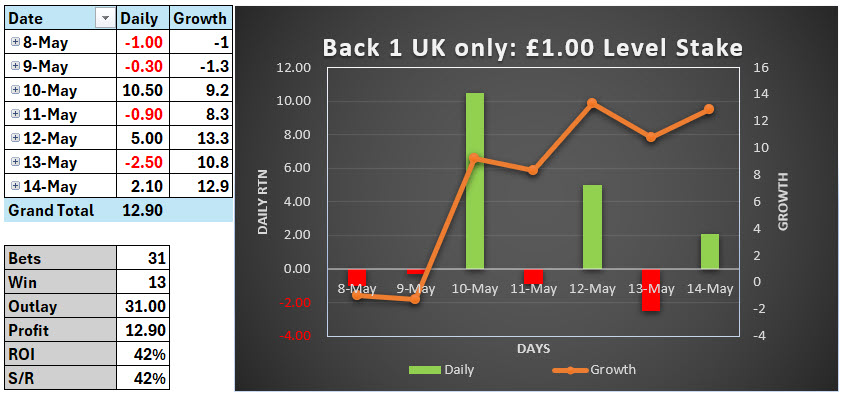
Back1 UK Only Level Staking.

Strategy 3.

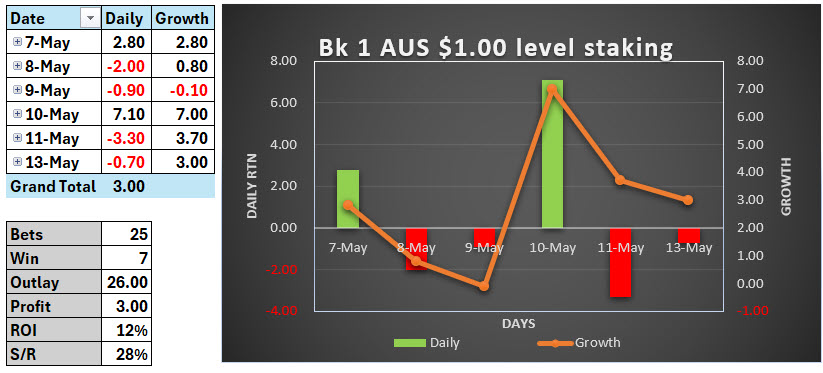
Back1 AUS Only Level Staking.

Strategy 4.

Back1 AUS Only SAW Staking.

Strategy 5.

Back 2 UK Only SAW Staking.

Strategy 6.

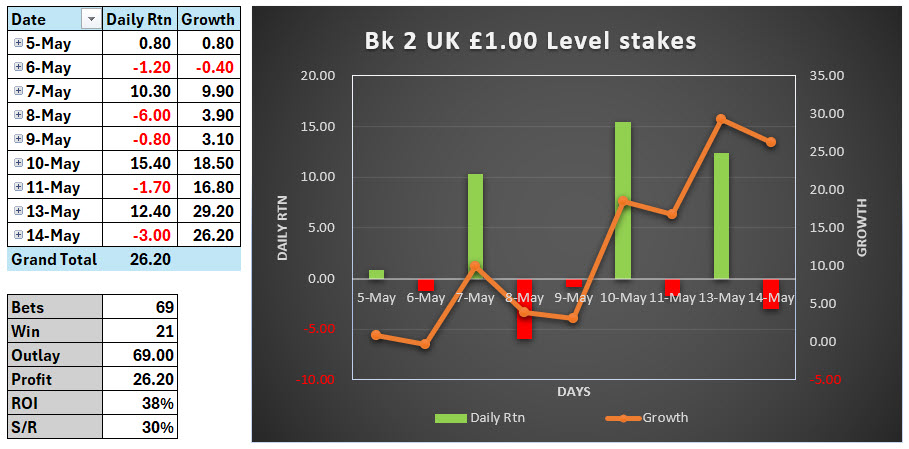
Back 2 UK Only Level Staking.

Strategy 7.

Back 4 UK Only SAW Staking.

Strategy 8.

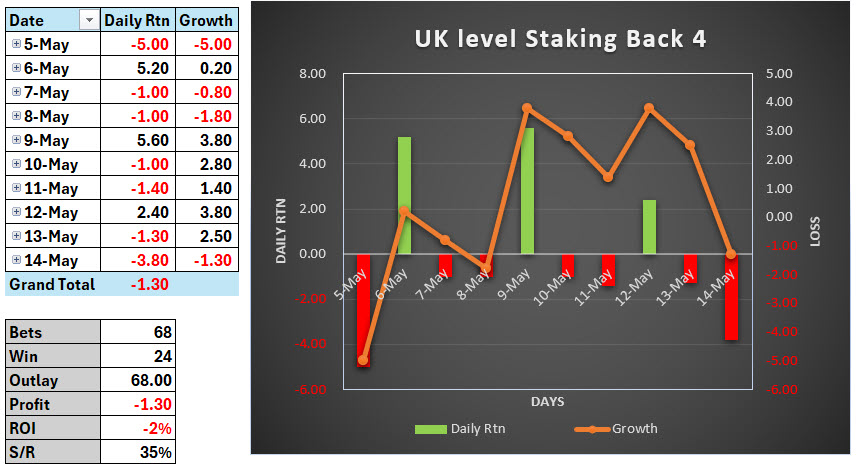
Back 4 UK Only Level Staking.

Strategy 9.

Lay 1 UK-AU-IRE Only SAW Staking. 1.00 Start Target.

Strategy 10.

Lay 2 UK-AU-IRE Only SAW Staking. 2.50 Start Target. We advise start with 1.00 Target

Strategy 11. UK only. 120 minutes to Trigger at 10minutes.

Strategy 12. UK only. 120 minutes to Trigger at 10minutes. Except Fav must be 3.00 or more.

Look For The long Game?

UK and Ireland Racing, Monitoring starts at 120 minutes out from the off, To Trigger Time .30 seconds.

The combined Return.

£1.00 Level Stake:

£97.40 Profit: ROI 34%

The Hero... was Ireland.

On 95 Bets

16 winners 6 days)

£69.00 profit: ROI 62%

Ave Winning Odds 10.74

UK started slowly, but last two days have been great.

On 195 Bets

30 winners (6 days)

£28.40 Profit: ROI 15%

Ave Winning Odds 7.30


These are the settings we are using on this.

Remember we are using Level Staking on This.


How about 2 hours out from the OFF


Download the free PDF.

Click here


http://winningmore.com/manual.htm
Thanks as always for your support
Cheers
Michael & Steve
www.winningmore.com
www.profitsportsbetting.com

YOUR TRUSTED BETTING ADVISER SINCE 2007
http://www.profitsportsbetting.com/worldbiggestpunters/world_biggest_punters.html
CHECK OUT OUR AMAZING AUTOMATED BETTING BOTS

http://winningmore.com/auto-betting-software/
BEST  FOOTBALL STATS SOFTWARE, I Love this << CLICK  HERE >>
http://dailyfootballstats.com/
See Betfair price minute by Minute for Daily UK & Ire Racing << Click Here>>
BEST FOOTBALL STRATEGIES  Click Here


If you don't accept this offer where will you be with your punting in a month from now?

2025©

http://www.winningmore.com/

Steve Davidson © 2025

Refund Policy

We, as a merchant, provide both products (goods) and services (information) to our customers.

Unlike companies that provide a tangible product that can be returned for a refund, our product is information. It can be used immediately upon viewing, and there is no product to return. Once a service has commenced, there can be no refund. Our services are the absolute best we can make them. Just as with the Stock Market, our customers must recognize that the information cannot be guaranteed, and that past performance is not a promise of future results. What is guaranteed is that each and every customer will receive the service that was purchased in full.

If merchandise or products are ordered through a Direct Mail advertisement or via the Internet, the guarantee, if any, is included in the mailing, promotion or service description. Our advertising will also include the terms and conditions for refunds on any books, publications and/or systems purchased.


Cheers

Steve Davidson